The workbench3 windows · 2 widgets · Take anywhere
 Product render
Spatial AR interface for FiveMoff
Panels that staywhere you put them.
Your apps, widgets and favorite places, together in a spatial interface for FiveM. Save a Space, invite a friend and make the headset feel like yours.
New in 0.4 · Play Update Minigolf
 Chess
Chess Beat
Beat Character studio
The headsetbooting
An item, not a menu.
It sits in the inventory. Use it and it goes on; use it again and it comes off. Everything below happens while it is on your face — and the moment it comes off, the world is exactly as you left it.
- ItemPut the headset on or take it off
- F7Open the home screen
- F6Open the control centre
- EFocus the window you are looking at
- GEdit the widgets on the walls
- EscDrop focus, back to passthrough
Defaults. F6, F7 and G are real key mappings — players rebind them in GTA's own settings. The focus key is the server owner's choice.
RoadVR uses first-person view by default; your server controls this setting.
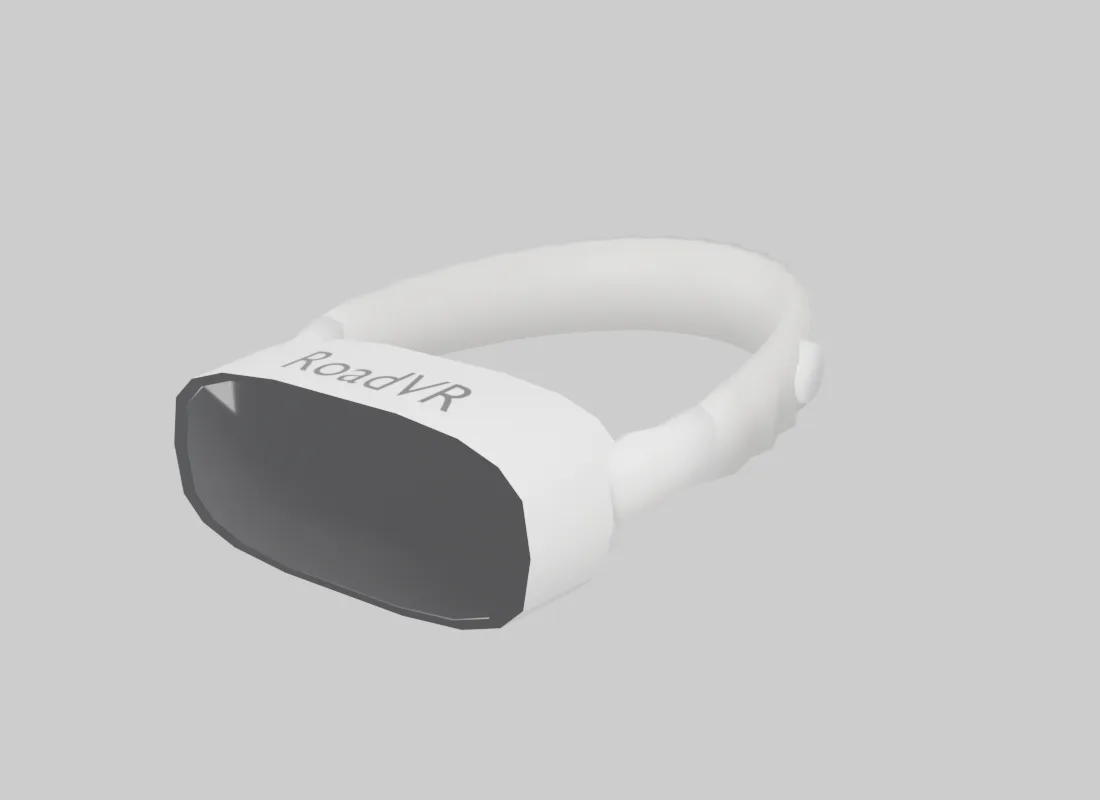
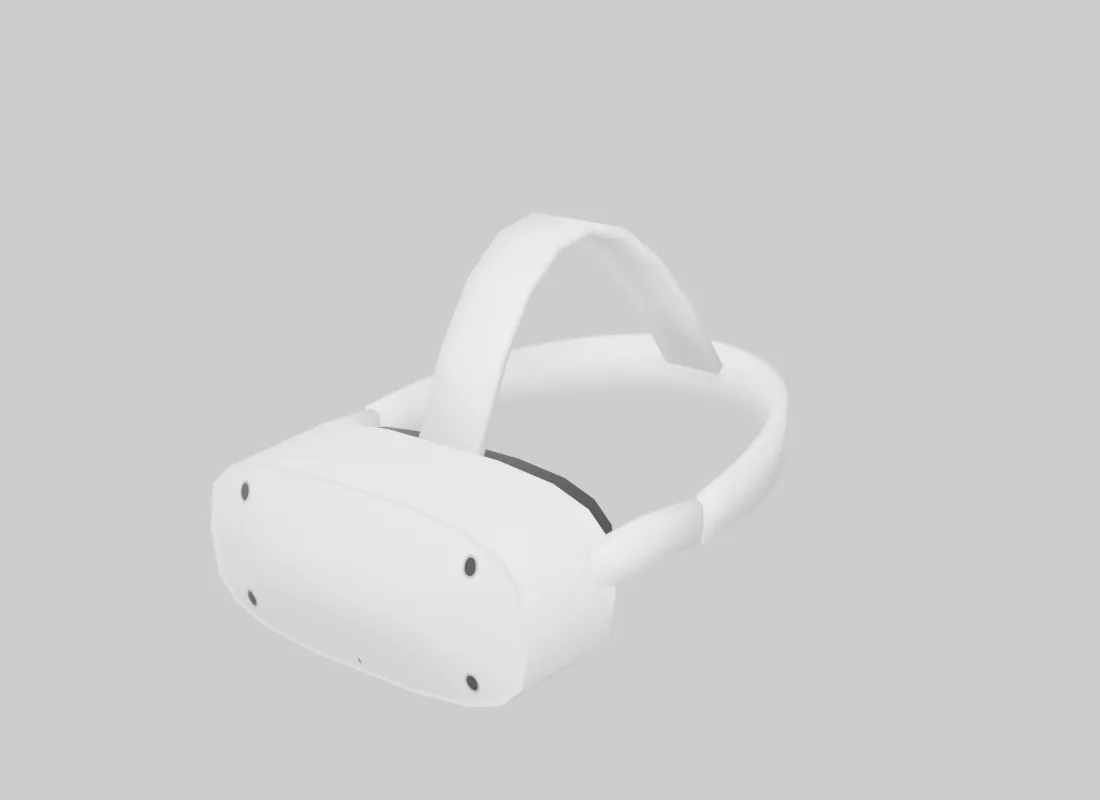
RoadVR includes two headset models: RoadVR and RoadVR Go. Both come with the product.
The housings
Two shells. Turn them.
Meet RoadVR and RoadVR Go — both included with the product. Drag to turn each model and explore its shape from every angle.
The first time it goes on, it sets you up.
Six short steps — language, look, how windows behave — and every answer can be changed again later in Settings.
- 1welcome
- 2beta
- 3language
- 4look
- 5windows
- 6ready
The in-game setup, from welcome to ready.
Windows float in the room around you and stay there. Six short steps and it is set up the way you want it.
The windowspassthrough
Four windows in the room.Not on a screen.
Push one out to arm's length, or hang it across the room six metres away. Then walk around it. It does not follow you, it does not turn to face you, it does not drift. It is a thing standing in a place, and you are the one moving.
That is the whole difference between an interface drawn on a monitor and one standing in the world.
Radius is per window. The player stands at the centre.
Move all
Grab the arrangement instead of a window. Spacing and distance hold; the whole set swings to where you are looking.
Take all along
Pin the arrangement to yourself. Walk, drive, get shot at — it comes with you and keeps its shape.
Arrange windows
One control puts everything back on an even arc, for when an evening of dragging has left the shell a mess.
One grab moves the arrangement. The next moves a single window.
Spaces
Your room.
Ready when you are.
Save the windows, nearby widgets and environment you have arranged. Open them together when it is time to work, relax or meet up.
- Six Spaces
- Keep separate arrangements per character.
- Portable or anchored
- Bring a layout along, or return to its saved location.
- Yours to update
- Replace a saved arrangement explicitly. Opening it leaves the saved template intact.
Spaces
Your workspace, ready in one click.
Windows, nearby widgets (40 m) and your environment come with you. Distant walls stay in place.
Back at home2 windows · 3 widgets · Stay here
Before the meet3 windows · 1 widget · Take anywhere
Open a sample Space, or save an arrangement in this preview.
The home screenpassthrough
Every app.Right where you look.
Pin up to six favorites and revisit your four recent apps. The launcher spreads sideways into three rows; additional apps use pages, without scrolling.
New in 0.4: hold an app or press Edit to drag the home screen into your own order, and give every built-in app an icon style — Studio, Outline or Monochrome, round or square.
The appspassthrough
Everyday tools. New possibilities.
Explore the built-in apps, from notes and navigation to a rhythm duel with a friend. Your server can add its own apps alongside them through the SDK.

Settings
Appearance, app icons, windows, comfort and notifications in one place. Pick an icon style — Studio, Outline or Monochrome — and tune glass, contrast, text size and motion.

Vehicles
Browse your garage and request a valet. Follow preparation and delivery, locate your vehicle, and see when a delivery fails.

SpacesNew
Save up to six arrangements of windows, nearby widgets and an environment. Bring a portable layout along or reopen an anchored room at its saved place.

DestinationsNew
Save up to twelve places, follow AR direction and distance, or invite a friend to an accepted meeting point.

Friends
Keep your contacts and online presence close. Find each other for a meeting point or a Beat challenge.
Beat
Eight tracks from Easy to Expert. Play solo with modifiers, challenge a friend with matching duel rules, and ask for another round.

Basketball
Put a real hoop and ball in the room. Flick the mouse to shoot while the game counts your points and streaks.
Map
A slice of the world map on the floor. Drag to explore and use the wheel to zoom.
Environments
Step into Alpine Lake, Sand Dunes or Lunar Surface — three built-in 3D landscapes — and set how far it surrounds you with the immersion slider.

Weather
Read the shared server temperature alongside the current sky and in-game time.

Clock
In-game time, a stopwatch and a session timer. Close its window while it runs; the completion card brings you back.

Calculator
A straightforward calculator beside the conversation, job or note that needs it.

Notes
Write beside your notes list in the redesigned glass interface. Draft protection keeps delayed refreshes and saves from overwriting your latest edits.

Messages
Read, reply and start a phone conversation through the headset. Requires RoadPhone, with classic and Pro detection.

Photos
Browse your RoadPhone camera roll. Open a picture in its own window and enlarge it for the room.

Drone
Put down a drone and fly it in assisted mode or full FPV acro with analog throttle.
MinigolfNew
Play the twelve-hole Adventure course or the five-hole Pro course in first person with up to six players. Share a room code and watch the same ball roll.
ChessNew
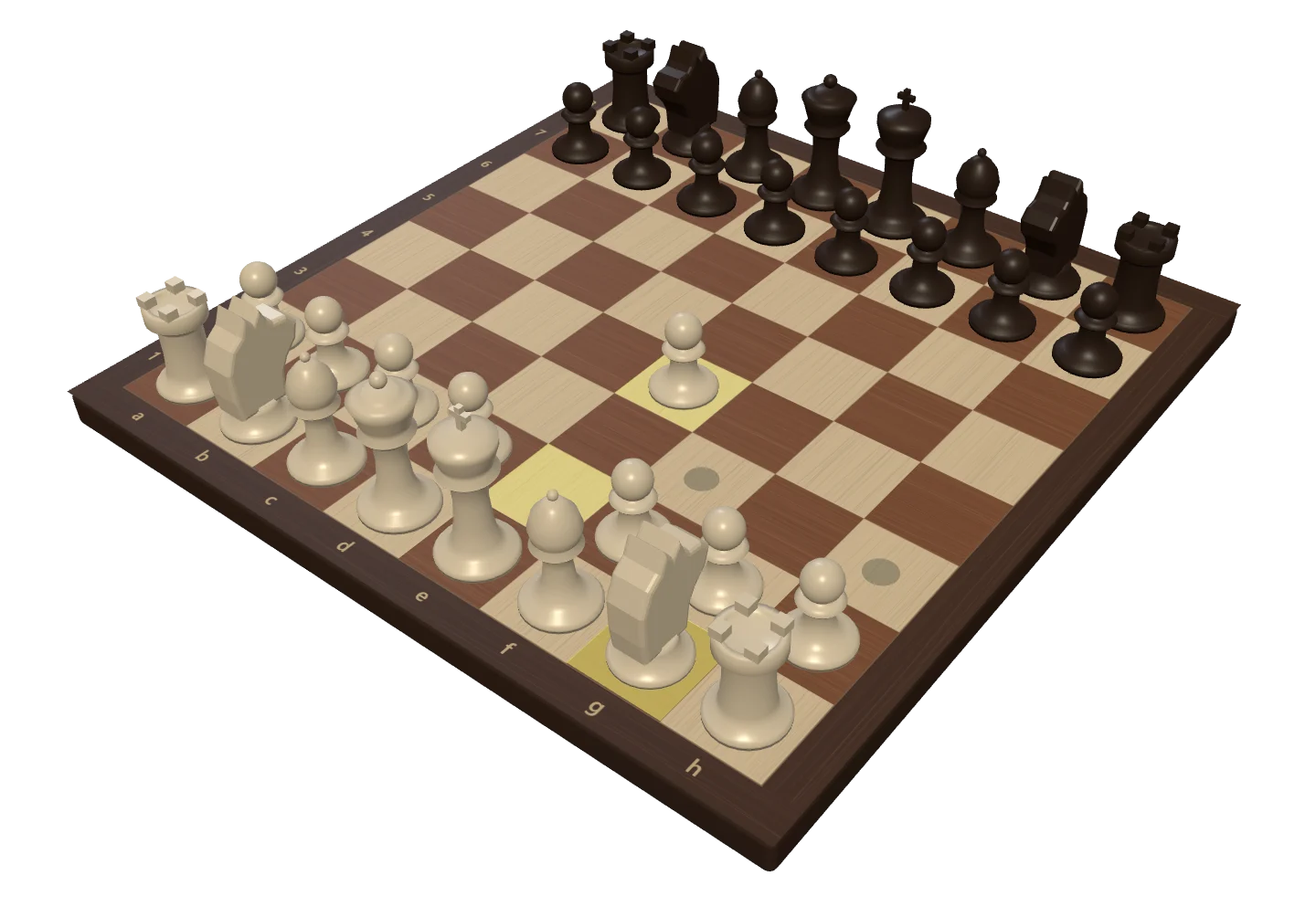
Put a board down in the world and play a friend or the computer, with clocks, draw offers and rematches.
Character studioNew
Build your character from a preset or from scratch, with a live 3D preview. Your look is saved and joins you in Minigolf.

Control Centre
Reach your quick switches, environments, passthrough and supported phone playback from one sheet.
Destinations & meeting points
A place to go.
Someone to meet.
Save your current position or a map waypoint. Follow the bearing in your field of view, then invite a friend to the same spot.
- Twelve saved places
- Keep your regular stops a few clicks away.
- AR guidance
- See direction and straight-line distance alongside the GTA waypoint.
- An invitation, on their terms
- Your friend accepts before the destination is shared. Invitations expire after 45 seconds.
The small things you use all day
More useful,
between the big moments.
A timer you can leave running. A car you can follow. A rematch you can ask for. The everyday apps have more to do.
Close the window. Keep the timer.
Timers keep running during your headset session. Pause, resume or reset, and open Clock straight from the completion notice. Taking the headset off resets the timer.
Know where your valet is.
See preparation, delivery and arrival, with a clear failure state if the driver cannot get to you. Vehicle lookup checks ownership, and duplicate requests are guarded.
One more round.
Challenge a friend, play the same song with matching duel rules, then invite them to a rematch. A forfeit lets the other player finish their track.
The useful kind of interruption.
Timer, valet and meeting-point cards take you to the relevant app. Do Not Disturb silences the popups while keeping the cards available.
New in 0.4 · Play Update
Game night,
anywhere in the city.
Minigolf, Chess and Beat are built in, and Character studio decides who shows up. Open a room, share the code and play with friends on your server.
Read the full 0.4.0 changelog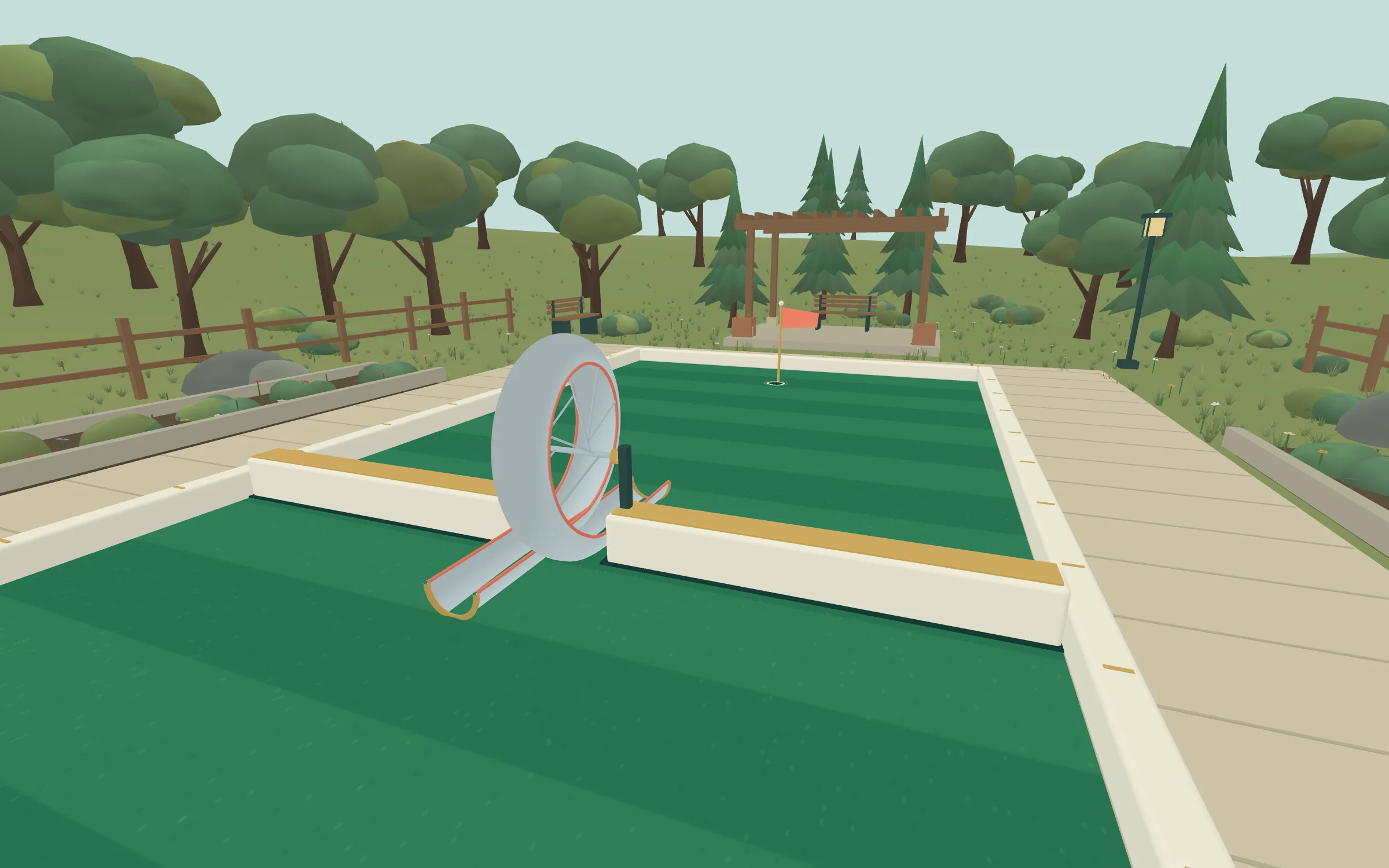
Minigolf
Two courses. One shared ball.
Walk a full-size course in first person, line up behind your ball, then hold and release to putt. Everyone in the room watches the same ball roll and takes their turn in order.
- Up to six players
- Share a six-letter code, or add a practice opponent and play alone.
- Adventure and Pro
- Twelve holes through a tunnel, over a creek, a bridge and a loop — or five Pro holes, from The dogleg to The gauntlet.
- Physics on the server
- Ramps, jumps, water and cup speed play out the same for everyone.
Chess
A real board, where you put it.
Set the board down on a table, a counter or the ground. A friend who joins sees it in the same spot and walks up to play. Or take on the computer.
- Friend or computer
- Three computer levels: Beginner, Club player and Strong.
- Clocks you choose
- From one minute to thirty, with or without increment, or no clock at all.
- A fair game
- The server checks every move. If a headset comes off, the seat is held for two minutes by default.
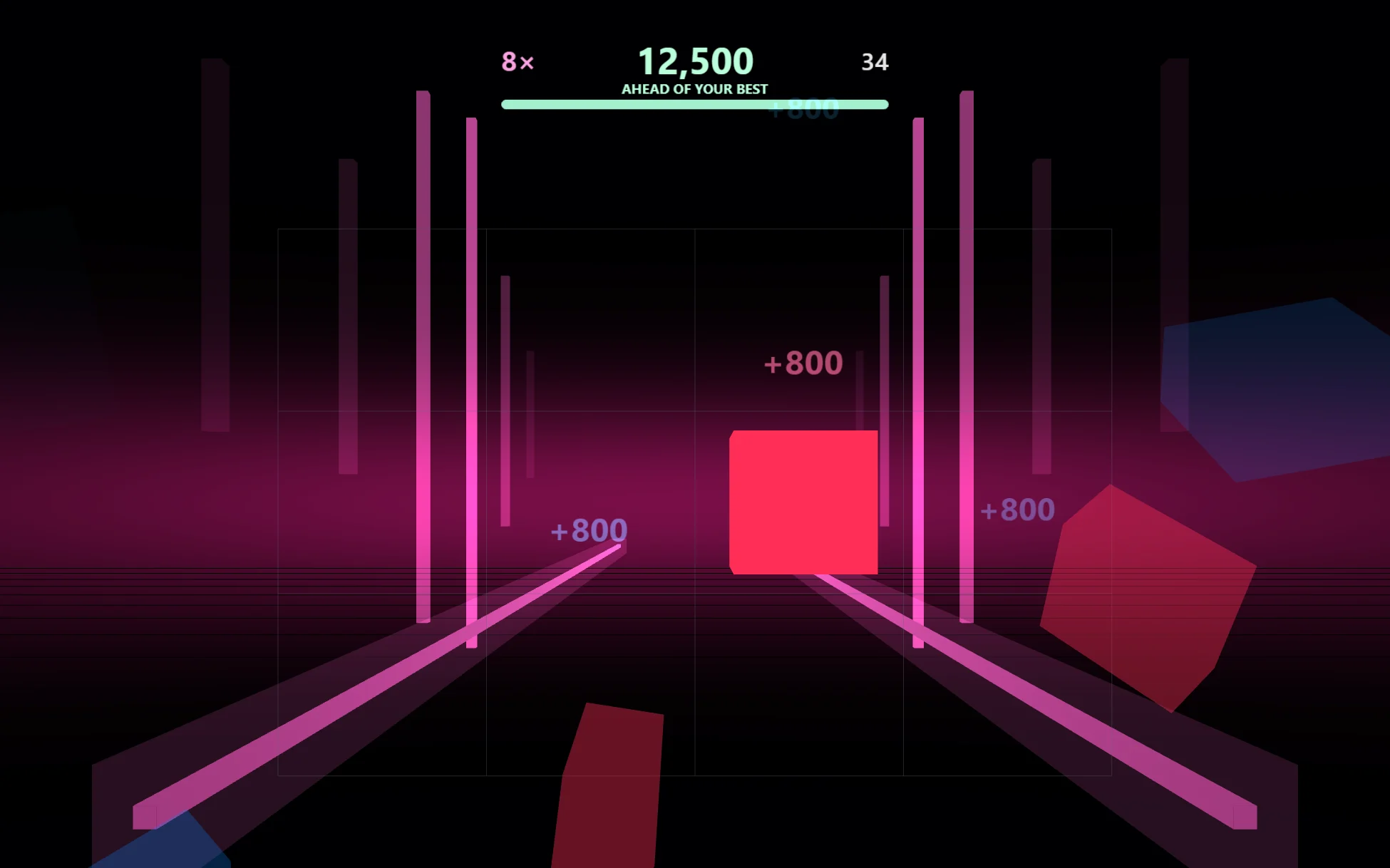
Beat
Cut to the rhythm.
Raise a saber in each hand and cut the blocks the music sends down the lane. The blocks are charted from the track itself, so every song plays the way it sounds.
- Eight tracks, Easy to Expert
- Walls, stacks and seven modifiers for solo runs. Servers can add their own songs to the list.
- Duels and rematches
- Challenge a friend on the same song with matching rules, then ask for another round.
- Leaderboards
- Personal bests and the top ten are kept per song and difficulty.
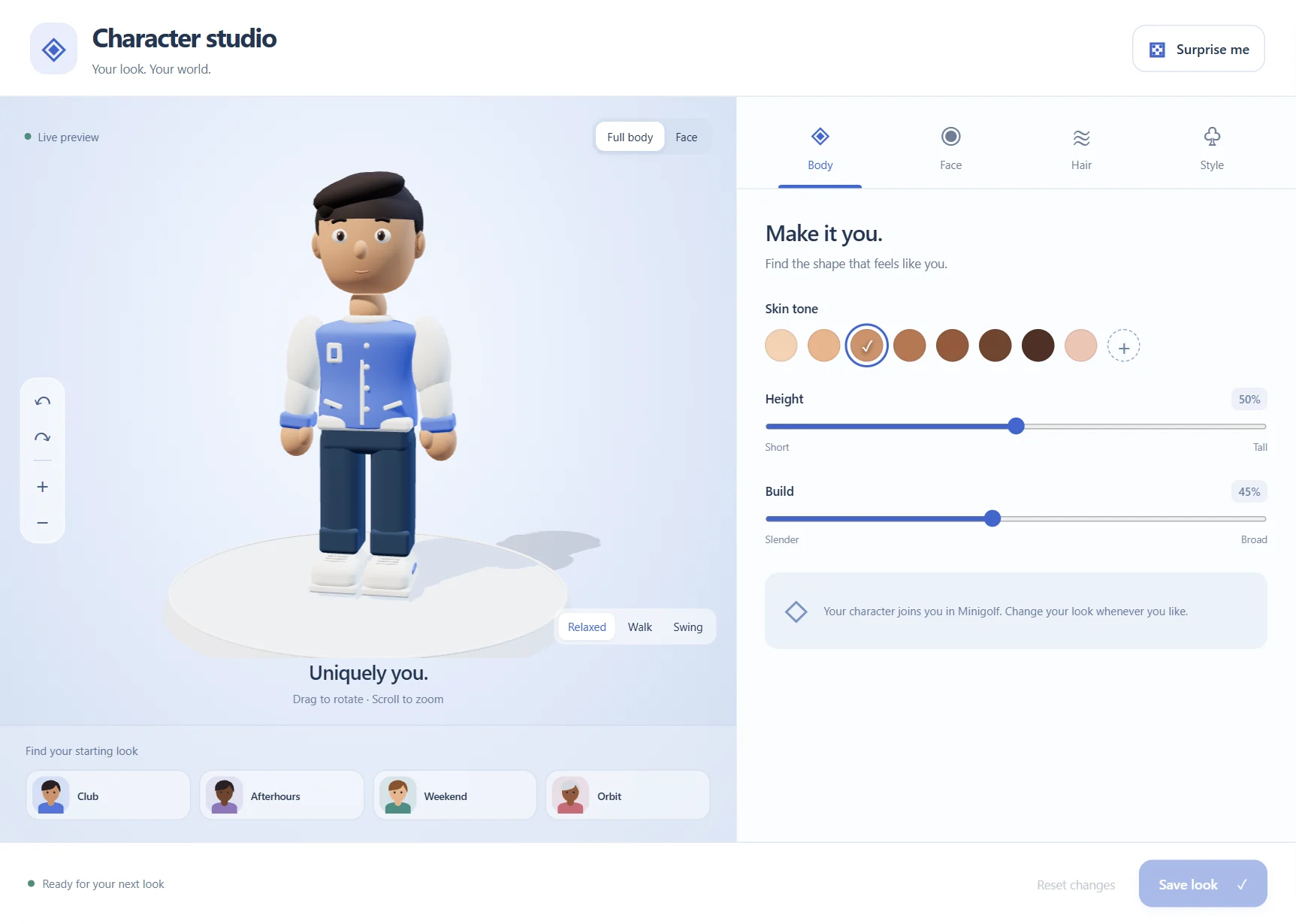
Character studio
Show up as yourself.
Start from a preset or shape your own look: body, face, hair and style. Your character is saved to your server character and joins you on the minigolf course.
- A live 3D preview
- Rotate and zoom, switch between full body and face, and see it walk or swing.
- Plenty to choose from
- Six hairstyles, three outfits, beards, glasses, earrings and headphones, with custom colours.
- Proportions that fit
- Adjust height, build, face width, eye spacing and nose size.
Environmentspassthrough
Or replace Los Santos entirely.
Pull one slider and Los Santos fades out behind somewhere else.
 Alpine Lake
 Sand Dunes
 Lunar Surface
In-engine renders of the three built-in landscapes.
All three are built in and generated in the interface, so there are no panorama files to supply. Your server decides which ones to offer.
Immersion85 %
How far the landscape surrounds you.
At the lowest level the world stays visible. At the highest level the landscape surrounds you completely.
Start walking and it pulls back on its own, so the street you actually have to cross is never hidden by the one you would rather be on.
The widgetswidgets
Your wall. Your kind of useful.
Windows float. Widgets belong to the building. Hang a clock in the hallway of your apartment and it is still hanging there next week — only you can see it, and only through the headset. Twelve of them per character.
Pick a widget from the wall to bring it closer. Explore the new clock faces and more designs below.
Explore widget designsSmall objects.
More character.
Meet the new clock faces, weather station and paper details. Choose a widget and make it yours, right here.
Watchwidgets
The widgets, in motion.
Wheel resizes · Left click places · Right click cancels
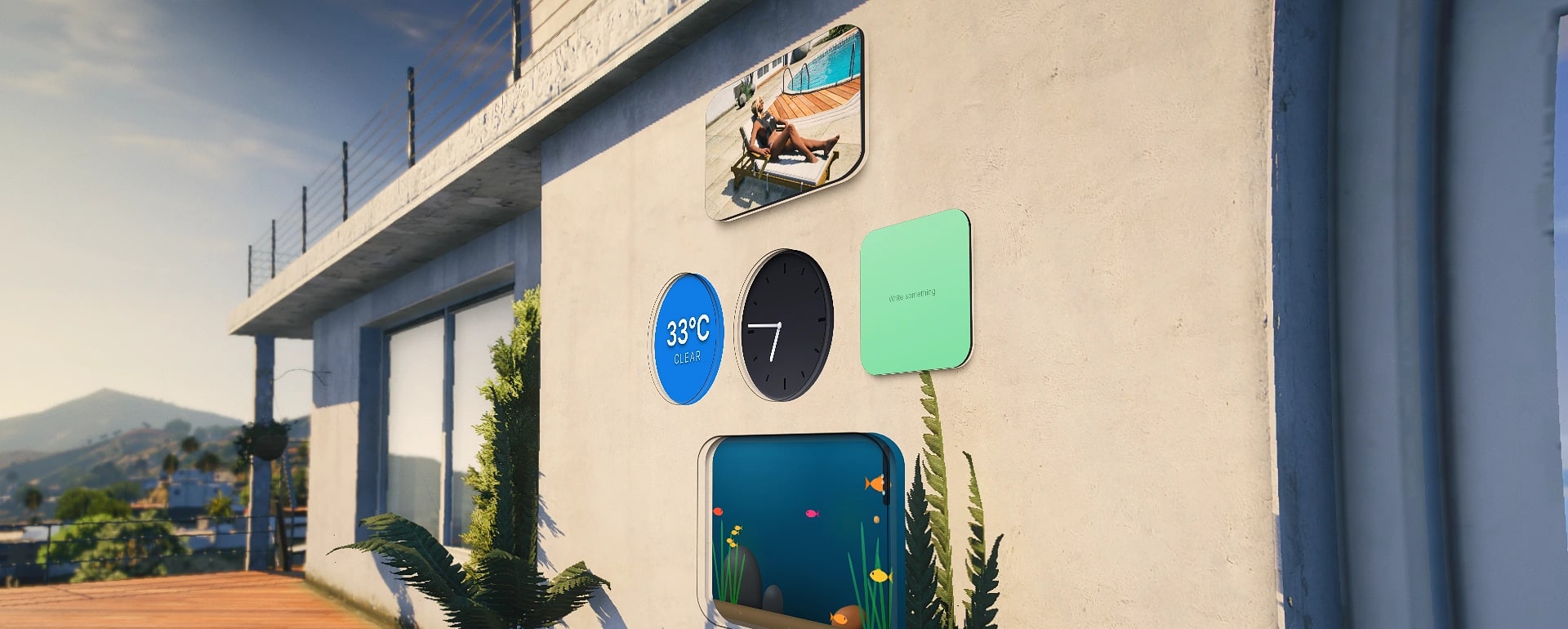
The wallwidgets
Five of the seven,on one wall.
In game. The two above are renders.
Two modesfocus
Scenery, or something you can click.
In passthrough the windows are scenery: the player runs, drives and shoots while the glass floats along. Press E and the window takes the mouse — the character stands still and the interface becomes clickable. Esc hands control back.
- Movement
- Free
- Mouse
- Camera
- Windows
- Scenery
Every state that can be entered can be left. Focus releases on death, on taking the headset off, and on resource stop.
Comfort is personal.
Layered glass and softer highlights give the redesigned apps a distinctive glass finish. Settings puts appearance, icon styles and comfort within reach. Adjust the glass, contrast and text, reduce motion, and choose where new windows appear.
Appearance
A look that feels at home in your space.
App icons
Accent colour
- Default window distance from 1.5 to 3.5 metres
- Start the launcher on all apps, favorites or recent apps
- Optional popups lasting 4, 8 or 12 seconds
- Reduced motion and live save feedback
Behind the wheelfocus
Behind the wheel it gets out of the way.
Get in a car and the windows step back by themselves. What stays is on the windscreen: your speed, the next turn, how far is left. Underneath it, the controls for doors, windows, lights, engine and locks — any of which you can switch off if your server already handles them somewhere else.
DoorsWindowsLightsVehicle
- Headlights
- High beam
- Hazards
- Interior
- Engine
- Central locking
Bolted to the windscreen — nothing to arrange, nothing in the way, and it fits the shape of the car it is in.
Only the engine and the locks ask the server first.You do not have the keys to this vehicle.
Speed, next turn, distance left.km/h or mph
On your serverpassthrough
Works with every framework.
Drop it in and it finds its own footing: it works out what you are running and adapts to it. No fork to pick, no version to match, nothing to wire up by hand.
- ESXdetected on start
- QBCoredetected on start
- Qboxdetected on start
- Anything elseruns standalone
Dependencies are ox_lib, oxmysql and OneSync. The database tables are created on first start.
Inventories it finds on its own
- ox_inventory
- qb-inventory
- qs-inventory
- one_inventory
- jaksam_inventory
- tgiann-inventory
- codem-inventory
- core_inventory
Vehicle keys it already understands
- qb-vehiclekeys
- qbx_vehiclekeys
- qs-vehiclekeys
- wasabi_carlock
- Renewed-Vehiclekeys
- fast-vehiclekeys
- filo_vehiclekey
- is_vehiclekeys
- mm_carkeys
- MrNewbVehicleKeys
- tc_keys
- tgiann-hotwire
Another key system plugs in through one export name in Config.Cockpit.keysExport.
Three lines and it runs.
- 1ox_lib and oxmysql must be running.
- 2Register an item roadvr_headset in the inventory (the name is Config.Item). An empty Config.Item means no item is needed — that is how it runs standalone.
- 3ensure roadvr in the server.cfg.
Profile tables are created on first start, including Spaces. Preserve your server configuration when updating and verify any optional integrations on your server.
> roadvr diagBridgeokqboxox_libokoxmysqlokInventoryokox_inventoryLocaleokenDatabaseokroadvr_profilesxsound--optional, not runningRoadPhone--optional, not running
Restart the resource. Nothing moves.
Stop it in the middle of a busy evening and start it again. Every window comes back exactly where it hung, and the widgets are still in the walls.
Stopped, started, unchanged.
For developerspassthrough
Ship your own app to the headset.
Your resource registers an app and its icon is on the home screen. Opening it loads your page into a window. Inside the frame you use whatever you like — plain HTML or a framework — and a crash in your app cannot take the headset down with it.
- 1
Serve two files
A page and an icon, in your own resource's files {} block. No ui_page: the window belongs to RoadVR.
- 2
Register once at start
One export call with an id, the page and a size in metres. It survives the headset coming off and going back on.
- 3
Talk to your own Lua
A plain fetch reaches your own RegisterNUICallback. Inbound goes through sendToRoadVrApp.
local ok, err = exports.roadvr:registerRoadVrApp({
    id     = 'myserver_dispatch',   -- unique, prefix it with your resource
    name   = 'Dispatch',            -- shown under the icon
    page   = 'ui/index.html',       -- a file in YOUR resource
    icon   = 'ui/icon.png',         -- a file in YOUR resource
    size   = { w = 1.1, h = 0.7 },  -- metres
    anchor = 'body',                -- 'body' follows you, 'world' stays put
})

if not ok then
    print(('registration failed: %s'):format(err))
endReturns ok, err. Registration fails when the id already belongs to another resource — nobody gets to replace someone else’s window. There is no need to unregister on stop: RoadVR notices your resource going away and closes the window itself.
See it move.shutdown
Still in beta
RoadVR is still being worked on. Most of it stands, some of it can still stumble — and how smooth it feels comes down to your frame rate.
Beta buildBugs and odd behaviour are possible. Report what you run into — right now that is worth more than anything else you could do.
Frame rate still mattersVersion 0.4 stops the interface asking for frames while nothing moves, and resting panels stay fixed in the world. It cannot remove all game-to-NUI latency; test the feel on your server and hardware.
Questions, bug reports and help getting it running — all of it happens in the Discord.
Join the DiscordLook at a window and press E to work with it. Everything here can be changed again in Settings.
Before it goes on your server
The details matter.
What is included, what is saved and what version 0.4 changes.
Your latest edit wins
Settings saves keep their order. Delayed Notes responses no longer overwrite a draft you are still writing.
Saved rooms stay yours
Profile and capacity checks guard room changes, and applying a Space preserves distant widget walls.
Clearer session boundaries
Old requests, invitations and duel messages are rejected after their session has ended.
More stable panel rendering
Fixed widgets reuse their transforms, and resting panels retain their position in the world. Reduce Motion also switches off window glide animations. Smoothness still depends on game and NUI frame timing.
Do I need a physical VR headset?
No. RoadVR is a FiveM resource that gives your character a spatial AR interface inside GTA V. Use your usual screen, mouse and keyboard.
What does my server need?
RoadVR supports ESX, QBCore, Qbox and standalone. It requires ox_lib, oxmysql and OneSync. Supported inventories and vehicle-key scripts are detected on start; register the headset item and start the resource, and profile tables are created automatically. Server-specific integrations still need configuration.
Which features need RoadPhone?
Messages and Photos use RoadPhone, with classic and Pro detection. Other built-in apps do not require a phone. Where configured, Notes and Control Centre can also integrate with RoadPhone.
What is saved?
Your per-character preferences, app layout and order, widget wall, Spaces, destinations and your Character studio look are saved. Spaces can hold up to six arrangements by default. Clock timers belong to the current headset session and reset when it is taken off.
Does it include the headset models and environments shown here?
Yes. RoadVR and RoadVR Go are included, and three 3D landscapes are built in: Alpine Lake, Sand Dunes and Lunar Surface. They are generated in the interface, so there are no panorama files to supply.
Can our developers add apps and widgets?
Yes. Other resources register apps and widgets alongside the built-ins through the SDK. Access controls and widget limits still apply. Documentation and the resource examples cover the integration.
Does version 0.4 eliminate all camera lag?
No. The interface now stops asking for frames while the picture is unchanged, camera messages are sent only on real movement, and resting panels stay fixed in the world. RoadVR remains a beta, and perceived steadiness depends on your game and NUI frame rate. Test it on your server and hardware.
What should I know before updating?
Replace the full resource and built interface together, preserve your server configuration and merge the new Config.Minigolf and Config.Chess blocks, then restart RoadVR. Missing keys fall back to the shipped defaults, and the character table is created automatically. A valet fee can remain charged if delivery fails after payment; there is no automatic refund.
Testimonials
What people are saying.
None of these people exist. None of them said this. Two of them are wanted.

“I love RoadVR. Best way to watch virtual reality porn.”
“Flew the drone through the bank at head height. Worth every second of the ban.”
“Put the aquarium in the panic room wall. My crew thinks I'm dead. I'm watching the fish.”
Pricing
One product. Everything in it.
Checking current price…
All 20 apps, Spaces and widgets included.
- RoadVR and RoadVR Go headset models
- Minigolf, Chess, Beat and Character studio
- Spaces, Destinations and seven wall widgets
- Three built-in 3D landscapes
- ESX, QBCore, Qbox or standalone
- English, German, Spanish and Italian
- An SDK for your own apps, widgets and markers